Page History: Web Part: Display Workflows by State
Compare Page Revisions
Page Revision: 2009/07/14 15:29
Jetfire Display Workflows by States Web Part
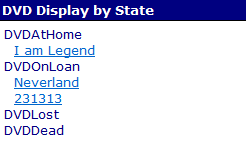
Jetfire workflows track a Current State and Previous State. Sometimes, it is very useful to display workflows based on the Current State that they are in.
Figure 1 shows a list o DVD's in your personal DVD library in various states. Here, we instantly see which DVD's are at Home and which are on loan.
Edit Properties of the Web Part
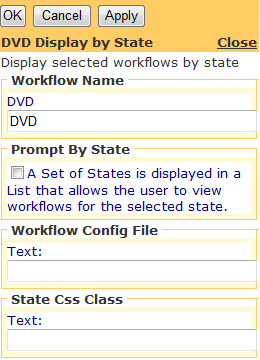
Figure 2: Editor for Display by States
The Web Part may be edited. It has the standard properties of a Jetfire Web Part. In addition, the following properties are used to customize the Web Part:
- WorkflowName – the workflow class that is displayed in the Web Part. the Workflow Class defines the states that are displayed. (It uses the latest version of the workflow class to display states.)
- Prompt by State – an option that allows the user to view workflows in one state at a time or view workflows in all states (shown in Figure 1).
- Workflow Config File - State names may be modified from their program definition using the Workflow Configuration file.
- State Css Class - a Css Class from the style sheet for changing the look of the State name.
- Jetfire Common Edit Properties